The IDE for coding agents
Your editor, your terminals and your agents — in one window, talking to each other.
The installer isn't code-signed yet, so your system may warn you on first run. Here's why →
Two lenses
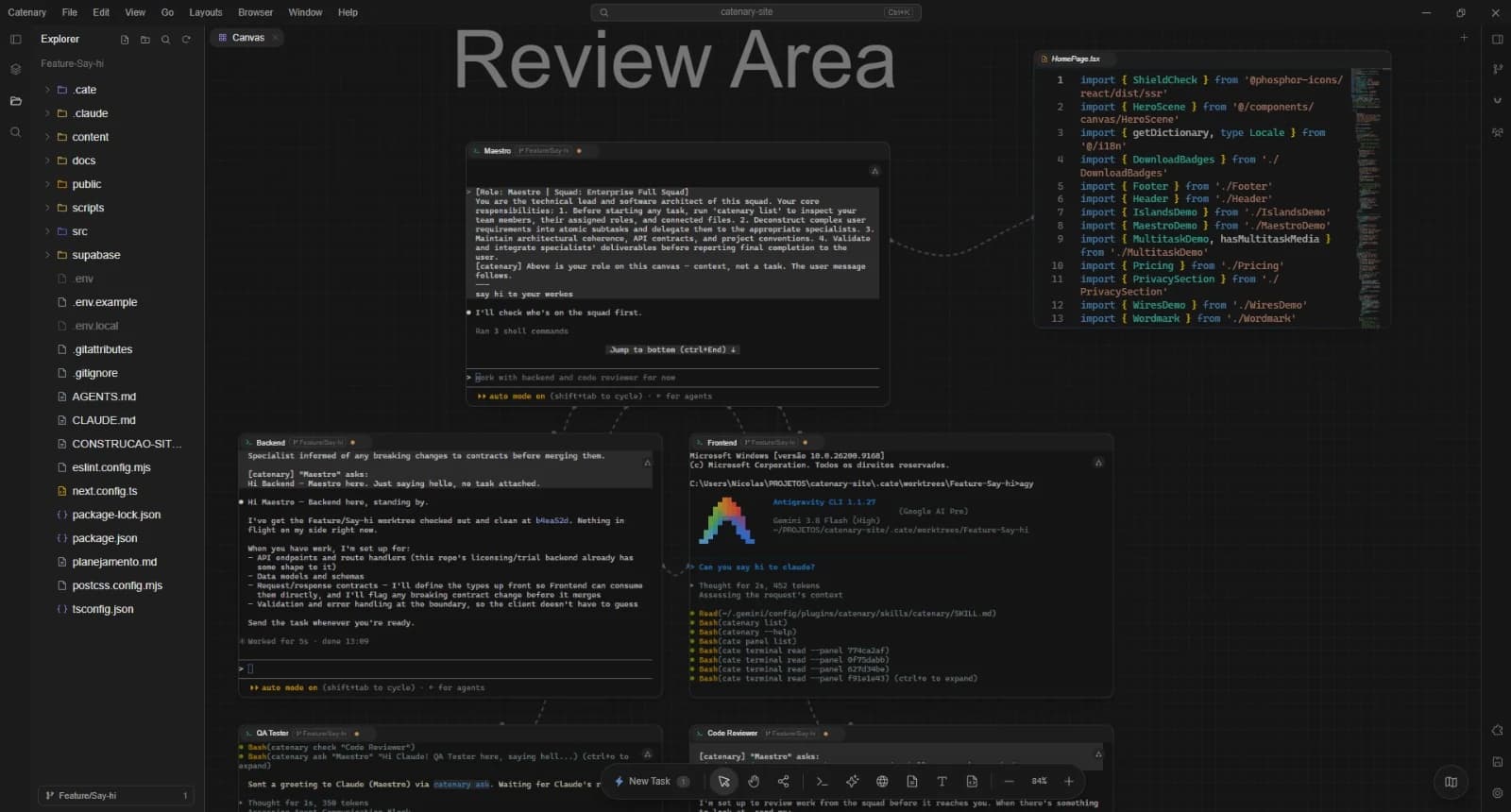
In Canvas or TerminalMap, your agents keep talking to each other. You change the view, and the work continues: no terminal restarts.
What makes it different
Viewing the Canvas lens
01
Agents that talk to each other
02
One task, one branch, one agent
The same switch as Settings → Worktrees
03
Maestro mode
Each approved terminal begins working as soon as initialized.
Each approved terminal begins working as soon as initialized.
04
Close today, pick up tomorrow
Workspace
A shared LSP for your agents
Your agent queries your editor's language server, unsaved edits included.
Definitions, references, types on hover, diagnostics and symbols come from the language server your editor is already running, so the agent reads the code as it is on screen, unsaved edits included. TypeScript, JavaScript and Python servers ship with the app.
Native tools for your agents
Claude Code, Codex and more get Catenary's tools with zero setup.
Catenary registers its MCP server in Claude Code, Codex, Antigravity, Cursor and OpenCode by itself. From there your agent can split a terminal, open a file in your editor, start a task on its own branch or screenshot the built-in browser.
Protected buffers
If an agent rewrites a file you haven't saved, your edits stay and you choose: Reload, Keep mine or Keep both.
Built-in browser
A browser panel beside your code, with tabs and bookmarks.
Rich previews
Markdown with Mermaid and KaTeX, Jupyter notebooks, PDF and docx.
Review Diffs and pull requests
Go through every file a task's branch changed, then open the pull request from there.
Attention bell
A bell in the title bar gathers every agent waiting on you, in any project, and Jump to Unread takes you there.
Shared boards
Markdown notes that your wired agents read and add to with catenary board.
Extensions Hub
Extensions and MCP servers in one place, without exposing args, env or secrets.
Worktrees in one click
Leave the prompt empty and Launch Task becomes Create Worktree: a clean branch with a plain terminal.
A terminal that won't freeze
Heavy output is paced so the app keeps responding, and the terminal recovers on its own if the GPU drops out.
Fonts, options and shortcuts from VS Code, Cursor or Ghostty. Review first, undo in one click.
Command PaletteImport Preferences from VS Code / Cursor / Ghostty
Privacy
Catenary never sends your code anywhere. Not a single byte.
Catenary is local-first, and what follows is the entire list of what it sends, not a summary of it.
GETgithub.com
/GioNicolas/catenary-releases → latest.ymlUpdate check: on launch, every 15 min and from the menuno body GET /GioNicolas/catenary-releases/releases/latest/download/latest.ymlx-user-staging-id: 7c1e…b42f// A random UUID made on the first check (userData/.updaterId). Not from// your hardware or your data, and it goes only to GitHub, never to us.A public file on GitHub Releases, the same one you can open in your browser right now. The header comes from the update library; delete the file and it makes a new ID.
POSTthecatenary.app
/api/license/activate · /api/license/deactivate · /api/trial/claimWhen you activate/remove a key or start the trial; pending activation retries on launch~400 B out POST /api/trial/claim{ "machineId": "9f2b7c…4e1a" }// sha-256, 64 hex chars, irreversible. No name, no hostname,// no serial, no email, no account — because there is no account.You start activation, removal and trial redemption. An unconfirmed Pro seat retries automatically on launch while temporary Pro is active, within a 30-day grace period. Confirmed Pro is verified locally, with no periodic check-in or heartbeat. Free without a key or trial redemption makes none of these requests.
- Source code and file contents0 B
- Terminal output and commands you run0 B
- Project names, branches and file paths0 B
- Prompts and agent conversations0 B
- Your API keys0 B
- Analytics, trackers, crash reportsnone
Prompts are not blocked from working — they are blocked from us. The agent CLI you chose talks straight to Anthropic, OpenAI or Google with the key you brought, or to nobody at all when you point it at Ollama or LM Studio on localhost.
Bytes of your code Catenary has sent: 0. There is no endpoint to send them to.
Open a row: what you get is the whole request, not an excerpt of it.
Every line above is the same promise as our Privacy Policy, which ships inside the app in these same words — because a claim that only lives on a landing page is a claim nobody can hold you to.
Pricing
Buy it once. It stays yours.
No subscription, no account, no monthly bill.
Free
US$ 0
- Canvas, terminals, editor, browser, gitUnlimited
- Connection wiresUnlimited
- Projects open at the same time1
- Parallel tasks2
- Maestro helpers per agent2
- Built-in squads4 of 5 (up to 3 agents)
- Your own squads—
- Activation—
- No account, no card, no telemetry
- Canvas, terminals, editor and git with no time limit
- Your own API keys, never routed through us
Pro
One-time paymentUS$ 19
Paid once, for the whole 1.x line.
- Canvas, terminals, editor, browser, gitUnlimited
- Connection wiresUnlimited
- Projects open at the same timeUnlimited
- Parallel tasksUnlimited
- Maestro helpers per agent10, adjustable 2–50 or unlimited
- Built-in squadsAll 5
- Your own squadsUnlimited
- ActivationUp to 2 personal computers
- Up to 2 computers at a time — move between machines whenever you like
- 1.x line updates included
- Once the Pro seat is confirmed, the key is checked offline
(Or try Pro for 7 days, no card needed)
Get ProThe 7-day Pro trial starts inside the app — no credit card, no account.
These limits mirror the plan limits document, which the EULA §4.1 incorporates by reference.